
Alyce Greer – Caption Coach
Writing Instagram captions can feel harder than creating the actual post. You may have a good image, a strong offer, or a useful idea. However, the caption box can still make your mind go blank.
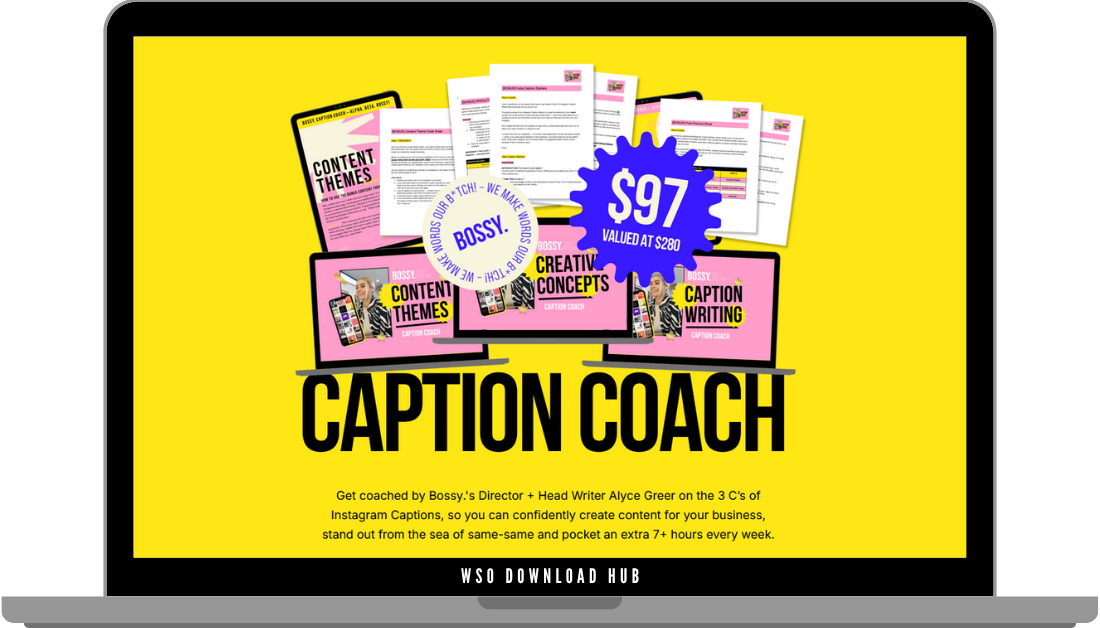
Caption Coach by Alyce Greer helps creators and business owners write captions with more confidence. The program gives learners a simple process for planning content, building creative ideas, and writing engaging captions. As a result, content creation can feel easier, faster, and more enjoyable.
This resource includes a three-part workshop series, plus helpful bonuses. These include templates, caption starters, cheat sheets, prompt exercises, and done-for-you formulas. Therefore, learners can stop guessing and start using a repeatable writing system.
Why Caption Coach Makes Content Easier
Many people post inconsistently because they do not know what to say. They may spend too much time thinking about content ideas. Then, they rush the caption and publish something that feels weak.
Caption Coach solves this by starting with planning. Instead of writing from scratch every time, learners first create content themes. These themes give every post a purpose and make planning much smoother.
Once the themes are clear, the creative process becomes less stressful. Moreover, captions start to feel more strategic because each post connects to the brand’s message. This helps creators build a feed that feels consistent, useful, and more personal.
Workshop 1: Content Themes
The first workshop focuses on content themes. These themes help brands decide what to post and why it matters. They also make it easier to create a steady flow of ideas.
Alyce guides learners through clever content theme examples. She also explains how strong themes support engaging and consistent Instagram content. Then, students identify themes that fit their own brand.
This step matters because strong copywriting often starts before writing. When you know your content themes, you do not need to invent a new direction every day. Instead, you can choose a theme and build the post from there.
The bonus Content Theme Cheat Sheet supports this process. In addition, the done-for-you content themes give learners ready-made ideas they can adapt.
Workshop 2: Creative Concepts
The second workshop introduces creative concepts. This part shows how a simple idea can become more memorable, interesting, and clickable. It also explains how creative thinking can improve captions, website copy, and other content.
Caption Coach teaches learners how to move beyond basic captions. Instead of writing plain descriptions, students learn how to create stronger angles. These concepts help posts stand out while staying on brand.
A creative concept can turn an ordinary message into something people want to read. For example, it can add humor, surprise, personality, or a sharper point of view. As a result, captions can feel less generic and more engaging.
This workshop also gives learners a step-by-step way to generate ideas. Therefore, they do not need to wait for inspiration. They can follow a process and build better concepts with practice.
Workshop 3: Caption Writing
The third workshop puts everything into action. It focuses on writing captions with two different methods. One method supports a more creative approach. The other helps save time with caption formulas.
This makes Caption Coach useful for different working styles. Some people enjoy writing from a fresh creative idea. Others need a quicker system that helps them post consistently. Fortunately, both methods can help improve confidence.
Alyce also shows her process in action by writing captions for fictional brands. This gives learners a clearer view of how the strategy works in real examples. Moreover, it helps them understand how to turn themes and concepts into finished captions.
Bonus Resources Inside Caption Coach
The bonuses add practical support to the workshops. They help learners apply the process faster and create content with less effort.
The bonus materials include:
- Content Theme Cheat Sheet
- Done-for-you Content Themes
- Writing Prompt Exercises
- Insta Caption Starters
- Insta Post Practice Sheet
- Done-for-you Caption Formulas
These resources help reduce the hardest parts of content creation. For example, caption starters can help users create a month of content faster. Meanwhile, caption formulas can save hours each week.
The writing prompt exercises also help spark ideas before writing. This can make the process feel more playful and less forced.
Who Can Benefit from Caption Coach?
Caption Coach can help many types of content creators. It works for e-commerce businesses, service providers, coaches, creatives, freelancers, and side hustlers. It can also support employees who manage social media as part of their job.
Product and service-based business owners can use the program to create more effective Instagram content. A strong caption can help build trust, explain value, and encourage bookings or sales. However, it needs more than a pretty feed.
Content-creating employees can also benefit from a faster process. Social media may only be one part of their role, yet it can take too much time. Therefore, a structured caption system can help them work more efficiently.
Freelancers and side hustlers can use Caption Coach to show personality and stand out. When many people offer similar services, the way you communicate matters. Strong captions can help explain what makes your work different.
Building a Smarter Instagram Content System
Instagram content becomes easier when you stop treating every post as a separate challenge. Caption Coach helps learners build a full system. First, they choose content themes. Next, they develop creative concepts. Then, they write captions using a clear method.
This process can support better consistency. It can also help brands sound more intentional and memorable. Additionally, it helps creators save time because they no longer start from zero.
A useful caption process usually includes:
- Choose a content theme
- Create a strong concept
- Write a clear opening line
- Add useful or relatable details
- End with a simple call to action
When these steps become familiar, writing captions feels less stressful. Consequently, content planning becomes a smoother part of the weekly workflow.
Final Thoughts
Caption Coach by Alyce Greer gives creators a practical way to improve Instagram captions. It covers content themes, creative concepts, caption writing, and time-saving templates. More importantly, it helps learners create content that sounds strategic, natural, and on brand.
For more creative and business learning resources, visit WSO Download Hub. The platform offers organized digital materials for creators, marketers, and online business owners. You can also explore the full collection of WSO Downloads to find more training programs for content and skill development.
To expand your digital product and publishing knowledge, explore Amazon KDP Low Content – The Complete Amazon KDP Masterclass. This related resource can help you learn more about building low-content publishing projects online.
Sales Page
Download Link for VIP Membership Users:

About The Author